
When a consumer selects your Advantage Professional agency on TrustedChoice.com, you’ll now receive a real-time request to confirm the referral. This step helps ensure consumers connect quickly with an available agent, while giving your agency more transparency, control, and priority access to high-intent opportunities.
To make the most of this feature, ensure you have email and SMS notifications enabled so you can confirm referrals quickly.
Why This Feature Matters
1. Real-Time Notifications
You’ll know the moment a consumer chooses your agency — no delays, no wondering, no missed chances. These instant alerts help you respond while the shopper is still actively looking for help.
2. Priority, Confirmed Connections
A quick confirmation secures your spot with that consumer. They picked you, and your confirmation tells them you’re ready right now. This creates a smoother, more confident experience for the shopper and gives your agency a competitive advantage.
3. Faster, High-Intent Conversations
Confirmed CCRs include a unique phone number and PIN, giving you a simple way to verify the call and track your outcomes. This means you can move from notification to conversation faster — and with stronger confidence in the consumer’s intent.
4. Time-Limited Access (30 Minutes)
Each referral is held for you for 30 minutes. If you’re not available, it automatically moves to another agent so the consumer gets timely help. When you are available, your fast response keeps you in front of serious shoppers.
5. More Control & Transparency
You get to choose which CCRs you accept based on appetite, workload, or timing. This helps your team stay focused on the opportunities that fit best, reducing noise and giving you clearer insight into each interaction.
6. Advantage Professional Priority
CCR confirmations are an exclusive benefit for Advantage Professional subscribers, giving your agency early access to high-intent opportunities that aren’t available to other tiers.
How the CCR Confirmation Flow Works
1. The consumer selects your agency
They complete the Consumer Funnel and choose your agency from their matched results.
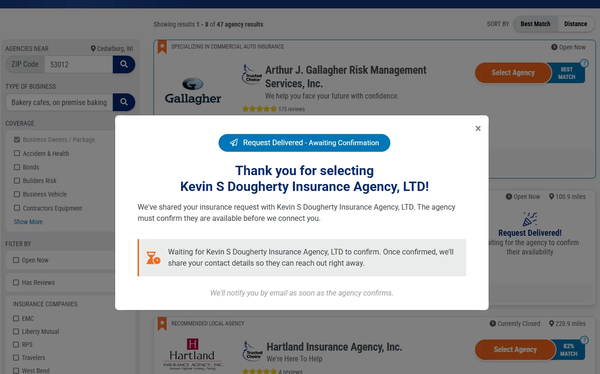
After the consumer clicks “Select Agency” on an Advantage Professional profile
2. You receive a CCR confirmation alert
Within seconds, you’ll receive a confirmation request by email and/or SMS. The consumer receives a parallel “Your request has been delivered” email as well.
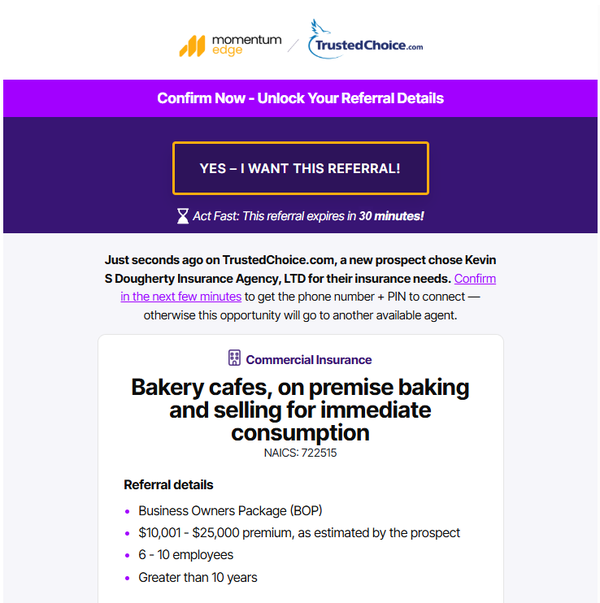
Example of an agency CCR notification email
3. Confirm or Decline the Referral
Click “Yes – I Want This Referral” in the email (or tap the SMS link) to confirm.
4. After You Confirm
You’ll see a confirmation screen and receive an email containing:
- The consumer’s risk and personal information
- A unique phone number + PIN to be transferred to your referral
- A direct link to update the referral status in the agency portal
The consumer is also notified that your agency will contact them shortly.
5. If Not Confirmed in Time
If you don’t respond within 30 minutes, the CCR is released to another available agent.
Where to Find Your Confirmed CCRs
In the Agency Portal
Log in to your Agency portal and navigate to Acquired Referrals → Tagged “Consumer Choice Referral”
In Momentum AMS
If you are a Momentum AMS customer you will also find your confirmed Consumer Choice Referrals by navigating to Prospects/Leads → Tagged “Edge-CCR”
Agency Best Practices
- Act quickly — confirmation speed improves your success rate.
- Enable SMS notifications for the fastest response time.
- Follow up immediately after confirmation to maximize conversion.
- Use “Update Referral Status” to help improve future matches.
Frequently Asked Questions
Q: What happens if I miss the 30-minute window?
The referral is released to another agent to maintain a seamless consumer experience.
Q: Where do confirmed CCRs appear?
In your Agency Portal under Acquired Referrals, tagged “Consumer Choice Referral.”
Q: Will CCRs flow into Momentum AMS?
Yes — confirmed CCRs appear under Prospects/Leads, tagged Edge-CCR.
Q: Can I update my appetite to improve matches?
Yes — update your appetite settings anytime in the Agency Portal.
Q: Why do I receive a phone number + PIN instead of the consumer’s real phone number?
We provide a unique Call Tracking Number (phone number + PIN) so your we can verify and track each CCR call. This ensures accuracy, helps measure lead quality, and protects both the consumer’s information and your reporting. The consumer’s actual phone number will appear in your Agency Portal once the referral is confirmed, giving you direct access for follow‑up and outreach.