

Momentum Edge
For Agents

Momentum Edge for Agents

Get a digital profile, improve your SEO, get recommended and get referrals

Claim-it

Get inbound, appetite-matching referrals delivered to you in real-time

For Insurance Companies

Momentum Edge for Insurers

Increase awareness, engage with more agents and drive the business you want

Inspiration

Blog

Top clicks and insider tricks for independent agents

Press

The latest news releases

Newsletter

Catch up on past issues of the newsletter

Marketplace

Agent Directory

Browse our the national directory of independent insurance agents

Insurance Company Directory

Browse our national directory of insurance carriers, MGAs and wholesalers

Live Referral Feed

See a real-time view of opportunities being delivered to independent agents right now!

Find an Insurance Market

Locate an insurance provider for your customers

Support

Help Desk

Get support for your Momentum Edge products

Agent Log In

Sign in to manage your profile and subscription

  1. Help Topics
  2.  » How to Update Your Payment Information

How to Update Your Payment Information

Ensure uninterrupted access to your Momentum Edge features by keeping your payment details current. Here's how!
Published: February 10, 2025

As a valued customer of Momentum Edge, we want to ensure you have uninterrupted access to the valuable resources we provide. A key part of maintaining your account is keeping your payment information up to date. If you need to update the credit card on file for your subscription, we’ve made the process simple and secure.

Why Keep Your Payment Information Updated?

Uninterrupted Service: Keeping your payment information current prevents disruptions to your Momentum Edge subscription and access to our resources.

Peace of Mind: Ensuring your payment details are accurate gives you confidence that your account remains in good standing.

Avoid Late Fees: Outdated payment information can result in declined transactions and potential late fees. Proactively updating your details helps you avoid these charges.

How to Update Your Credit Card

Updating your payment method is quick and easy. Just follow these simple steps:
1) Login to your profile.
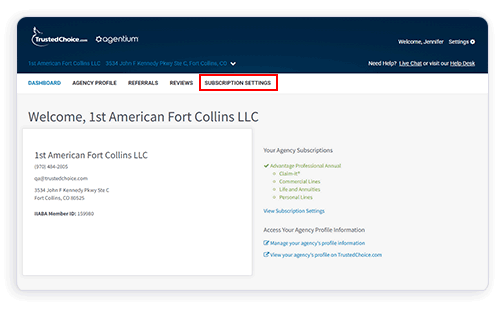
2) From your dashboard, click Subscription Settings.
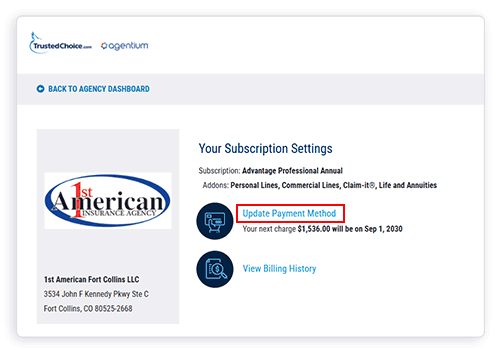
3) Click Update Payment Method.

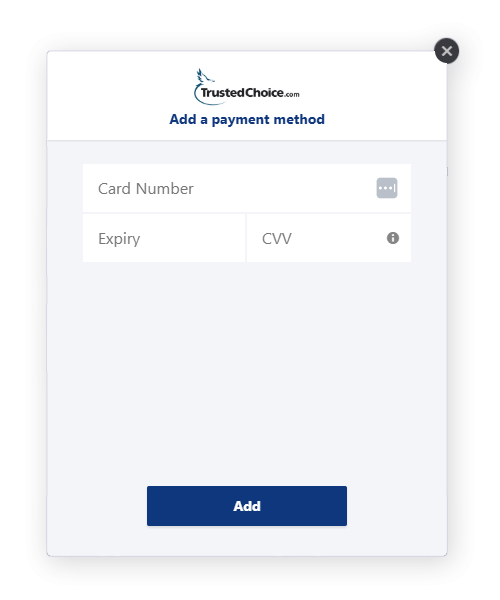
4) Update credit card information, then click Add. This payment will be set as the primary card.

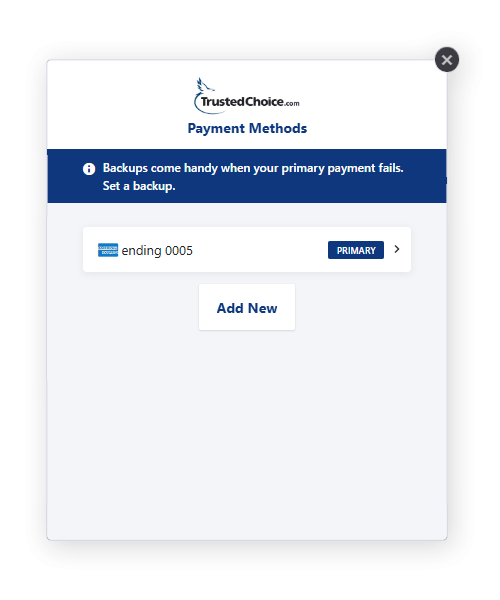
5) (Optional) Add a backup credit card in case your primary card fails. Simply click Add New to enter an additional card.
Need Help?

If you have any questions or encounter issues while updating your payment information, our customer support team is here to assist you. Please don’t hesitate to contact us for help—we’re committed to providing you with a seamless and positive experience.

Thank you for being a valued Momentum Edge customer!

More Posts

Momentum Edge Terms You Should Know

The digital world is full of marketing terms and acronyms like SEO. So you may ask yourself, what is SEO? What are organic sessions? What's a unique user? It becomes a little overwhelming. You start to feel like you're reading a different language. And if you're...

What are Claim-it Referrals?

Claim-it® is a patent-pending opportunity distribution system that combines our Agency Recommendation Engine with a real-time, crowd-sourced notification process. Claim-it Referrals are high-intent, appetite-matching, exclusive inbound opportunities from insurance...

What Are the Different Types of Momentum Edge Subscriptions?

We pride ourselves on providing the top online resources for connecting independent insurance agents with prospective insurance consumers. To ensure our agents are getting the most exposure possible online, we deliver Momentum Edge products designed to put them in...

Get Recommended on TrustedChoice.com

Ready to take it to the next level?

Sign up for a free demo and let our experts show you what Momentum Edge can do for you!